Organizations increasingly rely on Microsoft 365 tools to manage communication, collaboration, and internal operations within a unified environment. As workplaces grow more dependent on digital workflows, the need for structured support processes becomes more important to maintain efficiency and accountability. Ticketing solutions help teams organize requests, track issues, and ensure tasks are addressed in a timely manner while maintaining visibility across departments. In this context, integrating support workflows into familiar productivity tools reduces friction for users and streamlines day-to-day operations.
One common approach is using a Microsoft ticket system within the Microsoft 365 ecosystem, where service requests and issue tracking are managed alongside emails, chats, and documents. This integration allows support teams to centralize incoming requests while maintaining transparency across resolution stages. It also supports better coordination between departments by keeping communication and updates within a shared digital workspace. As a result, organizations can improve responsiveness and maintain consistent service management practices without relying on disconnected platforms.
Benefits of Integrated Ticketing
Organizations that leverage integrated ticketing in Microsoft 365 realize numerous benefits, from smarter resource utilization to enhanced customer and employee experiences. These include:
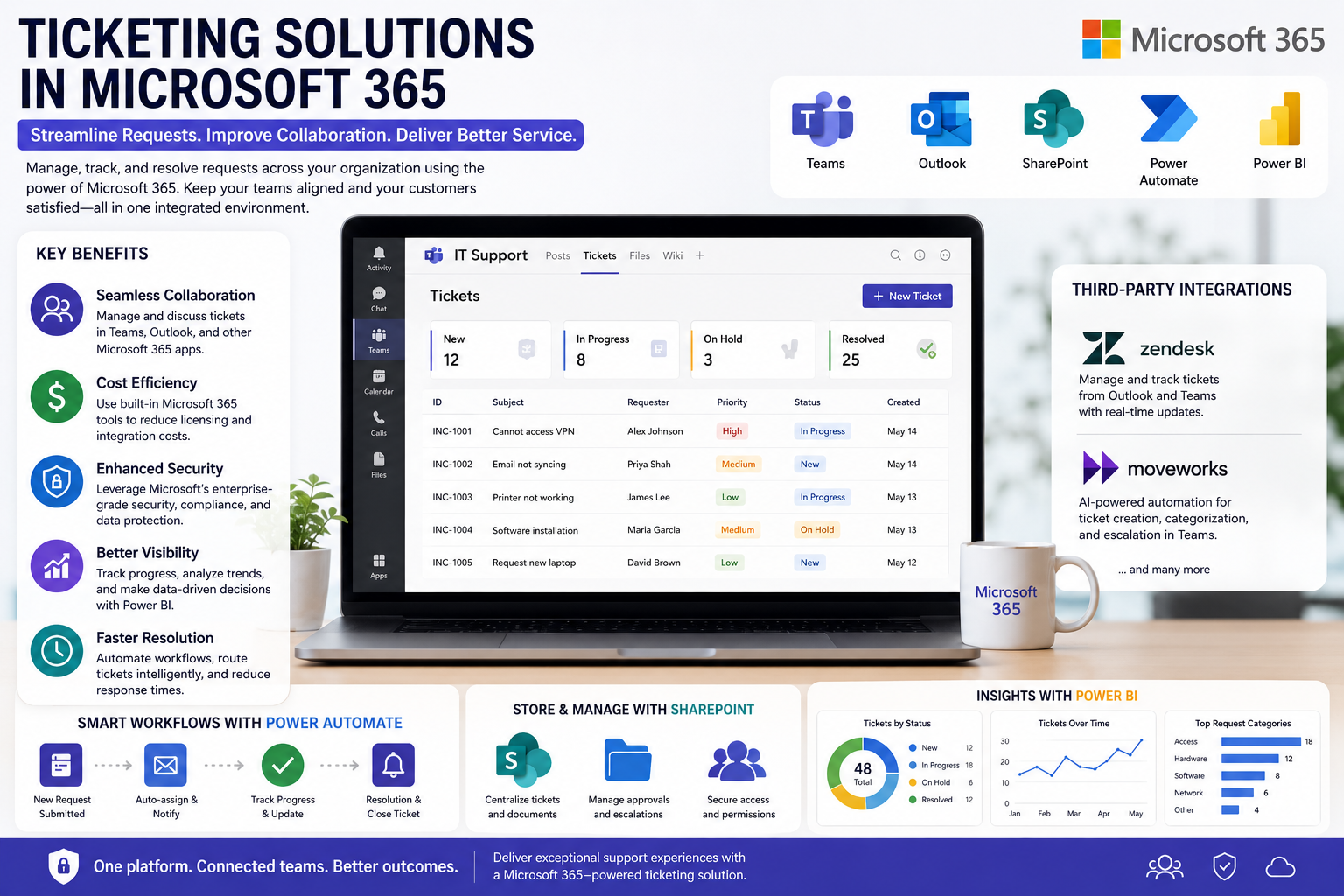
- Seamless Collaboration: With tools like Microsoft Teams and Outlook, team members can manage, escalate, and discuss tickets in real time within their usual workspaces. This reduces the time spent switching between apps and ensures all communication stays consolidated.
- Cost Efficiency: Leveraging Microsoft 365’s built-in features reduces reliance on expensive, standalone ticketing systems. Businesses can often avoid extra licensing fees and costly integrations while increasing the usefulness of their current subscriptions.
- Enhanced Security: By leveraging Microsoft’s trusted security infrastructure, ticket data remains protected and compliant with industry regulations, a crucial requirement for organizations in regulated industries.
Microsoft 365 not only streamlines ticket management but also brings advanced security and privacy controls to the process. Microsoft provides robust data loss prevention and threat protection capabilities, giving IT administrators peace of mind as they implement these integrated solutions.
Native Ticketing Solutions
Within Microsoft 365, several native features can be adapted to function as effective ticketing systems for different business needs:
- Microsoft Teams: Channels, tabs, and bots can be configured for ticket management. Incoming tickets may be created via forms, routed to appropriate groups, discussed with stakeholders, and resolved through chat threads and document sharing inside the Teams environment.
- SharePoint: SharePoint’s custom lists, libraries, and workflows offer a practical way to track tickets, store supporting documentation, and integrate approvals. Organizations can automate escalations and reporting with minimal custom development.
As TechRadar highlights, the customization and accessibility of these tools make Microsoft 365 a strong foundation for internal project and ticket management systems.
Third-Party Integrations
While Microsoft 365’s native features cover much of what organizations need, additional functionality may be desired. Many leading ticketing platforms offer integrations that connect seamlessly to the Microsoft 365 environment, expanding automation, analytics, and AI-driven capabilities:
- Zendesk: Zendesk’s integration with Microsoft 365 brings ticket management and updates into familiar tools such as Outlook and Teams. This helps unify conversations and workflows and supports improved tracking of customer issues.
- Moveworks: Moveworks uses AI to automate ticket creation, categorization, and escalation in conjunction with Microsoft Teams and Copilot, leading to faster incident resolution and reduced manual effort.
Customization and Flexibility
No two businesses have the same operational workflows or support processes. Microsoft 365’s array of automation and reporting tools ensures ticketing systems can be tailored as required:
- Power Automate: This tool connects apps, automates ticket routing and notifications, and defines escalations based on ticket type or urgency, reducing the need for manual follow-up.
- Power BI: With detailed visualizations, managers can analyze support trends, measure team performance, and proactively identify opportunities for continuous improvement.
Implementation Considerations
To ensure a smooth rollout and maximize user adoption, administrators should implement a structured plan. User training is crucial, as the new ticketing workflows in Microsoft 365 may require users to learn new processes. Providing clear documentation and role-specific training can help users become proficient more quickly and reduce errors. Careful planning for data migration from legacy systems is essential to ensure a seamless transfer of support data. Furthermore, evaluating customization needs relative to departmental objectives will help determine the appropriate level of customization and automation, whether through native tools or third-party solutions.
Conclusion
Integrating ticketing solutions directly into the Microsoft 365 ecosystem delivers meaningful benefits to businesses seeking greater efficiency, security, and collaboration in their support processes. Whether using native tools or third-party integrations, Microsoft 365 empowers organizations to streamline operations, enhance service quality, and adapt quickly to changing business needs, all within a secure, familiar digital environment.